
Where is the drill, who has it, and is it safe to use?
Equipment usually lives in a spreadsheet, a clipboard at the tool crib and one person's memory, and none of the three can tell you what is out, what is late and what is in the shop this morning.
Equipment Inventory gives every item a record and a tag. Lending it, inspecting it, repairing it and retiring it are all things you do to that record, so the list always knows.
Check out. Check in. Inspect. Maintain. Dispose. One list of what you have.
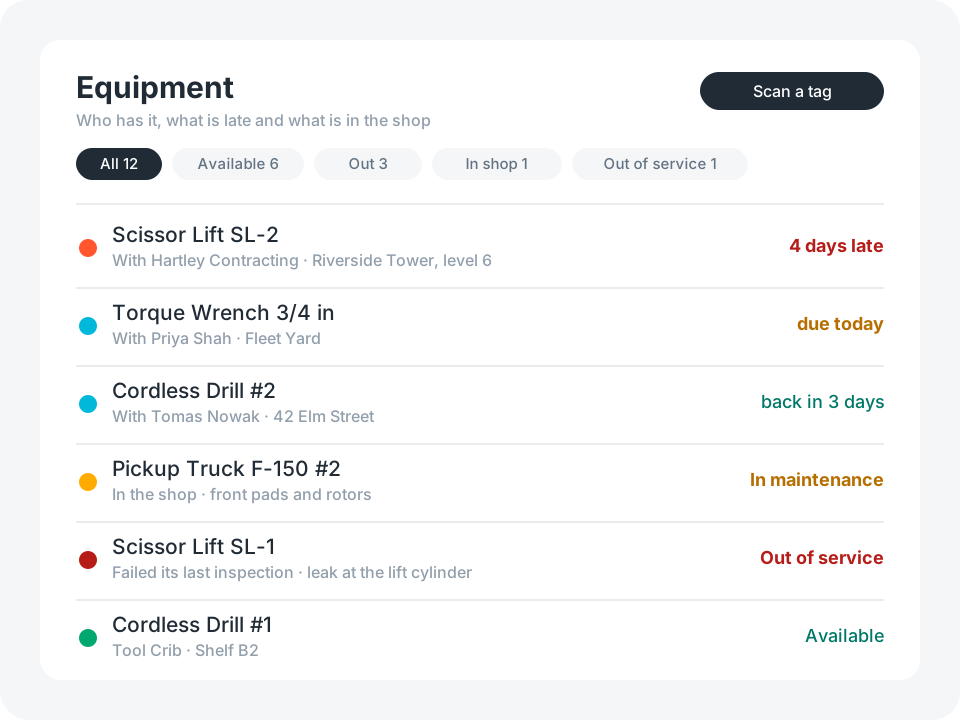
The whole life of an item, wired together on day one
Nothing to model, nothing to connect. Open it and start scanning.
Equipment and types
A record per item with a scannable tag, photos and a home location. The type carries the inspection rule, the service rule and the expected life.
Check-outs
Who took it, until when, what shape it was in, a borrower signature, and how it came back.
Inspections
Result, condition, checks ticked, meter reading, photos, GPS and a signature, on a schedule the type sets.
Maintenance
Repairs, services and calibrations from the request to the finished work, with labor and parts cost.
Disposal
Method, reason, buyer, proceeds, approval, data wiped, and the gain or loss against book value.
Dashboard
Available, checked out, due back today, in the shop, out of service, and where it is all kept. Plus locations, people and a printable equipment report.
See It in Action
Start with the template, then reshape it in plain English: a Reserved status, a new equipment type, a text to the supervisor when a return is late. No coding required.
Try for FreeEvery loan is a record, and the item reads who has it
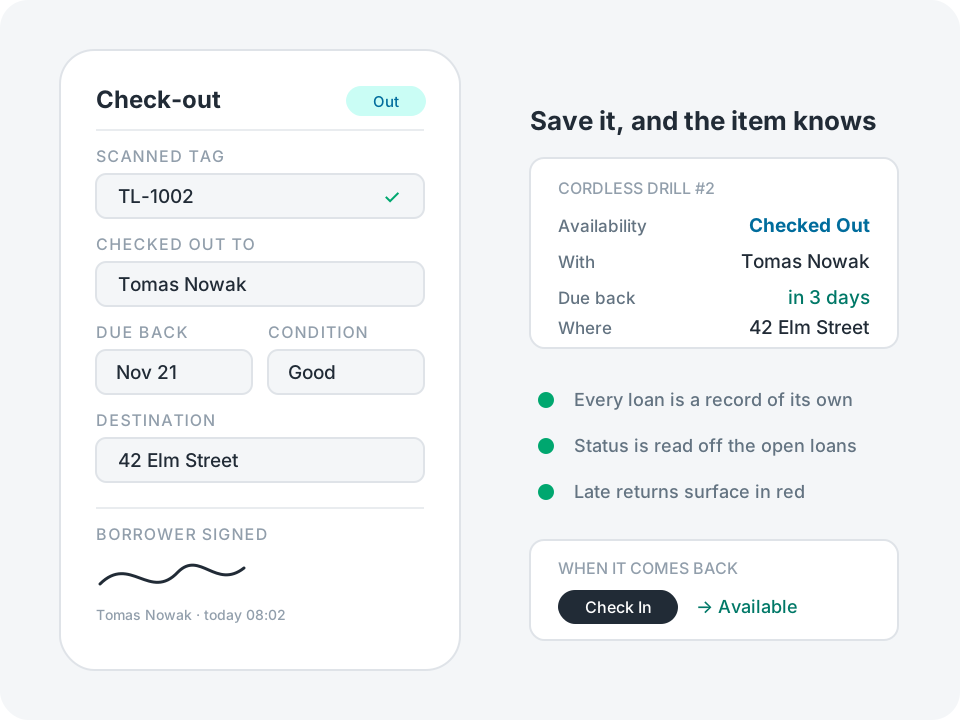
Lending is a record of its own: who took it, when, until when, and in what shape. Nobody keeps a status up to date. The item reads Checked Out, names the holder and shows the date it is due back, all taken from the loans that are still open.
- Scan the tag, pick the person, set a due date, or leave the loan open-ended
- Condition out and condition in, photos, a note for what came back damaged, and a borrower signature if you want one
- Check In closes the loan with today's date, and the item reads Available again
- A laptop or a truck issued to one person is an assigned custodian, which is a separate field from a loan
Result: who has what is one list, with late returns in red and the dashboard listing what is out soonest-due first.
Take out what you do not use
A tool crib, an events company and a lab want very different apps. The template ships with the whole life cycle, because adding a feature you did not know you needed is harder than removing one you can see.
Tap any field you do not use and choose Hide Field. It stops appearing on the form, keeps whatever was already in it, and comes back the same way. For a whole feature, tell the assistant: "Remove disposal tracking" or "I don't need meters".
What people usually take out first:
Check-outs, if nothing ever leaves the building
Meters and meter-based service
Purchase cost, book value and depreciation
Inspections, if your equipment needs none
Maintenance, if repairs are somebody else’s job
Disposal, if equipment is kept until it dies
Signatures, GPS stamps and the printable report
Where the template stops
It is a starting point, not a finished asset management system. These are the edges you are most likely to hit, and each one is a change you can ask the assistant for.
The item works out its own answers when the item is saved. Log a check-out, an inspection or a repair from its screen, then tap Save Equipment: that one tap is what moves the status and the schedules. Leave without saving and the app asks.
Check-outs, inspections and repairs belong to their item: delete the item and its history goes with it. Dispose of equipment instead of deleting it, and export first if the record has to outlive the item.
A log row does not carry a link back to its item, so the lists of check-outs, inspections and maintenance name each row by the tag that was scanned. Scan or type the tag and the lists read properly; skip it and a row says only who, when and what. The lists are read-only: a record is changed from its item’s own screen, because that is where the item is saved afterwards.
Items are tracked one by one. Twenty hard hats are twenty records, or one record for the kit. There are no quantities, so consumables and bulk stock need a stock count instead.
An item is assumed to be out once at a time. Check it out again before it is checked in and the item warns you. It shows the earliest due date, so a late loan is not hidden behind one that is not, but it can name only one holder, whichever name sorts last.
Nothing is blocked, only flagged. An item that is out of service, overdue for inspection or already out can still be checked out, and there are no reservations or approvals before a loan.
The dashboard counts what a query can answer exactly: due back today, due this week, in the shop. Overdue is a live reading, so it is shown in red on the list and sorted to the top of the dashboard’s lists, not stored as a number on a card. The Equipment list itself opens by name: sort it by due date to bring the late ones up.
Nothing chases anyone. A late return or a passed due date does not send an email or a notification, so somebody has to open the app. That is a change you can ask the assistant for.
Two inspections on one day are told apart by the time on each, and the later one gives the item its last result. Hide the Time field and they are ordered by the inspector’s name instead, which can put an earlier result ahead of a later one.
The current meter is the highest reading logged anywhere on the item, not necessarily the newest. Replace a meter, or correct a typo downwards, and the old high number stays.
Book value is straight-line over the type’s useful life and is worked out when the item is saved, so for equipment still in service it is the value as of the last save.
The features are wired together: an item’s availability is read from its check-outs and its maintenance. Hiding a field only hides it. Taking a whole feature out is a change to ask the assistant for, so it can adjust the formulas that read it.